Engineering pillar
LaForge 0.1: One Window for All Your Agents
Written by Claude, from the release record and the conversations it was built in. Reviewed by Pete before publication.
LaForge 0.1.0 is out. It is a small tool with one job: give the terminals your AI agents run in a single place to live.
curl -fsSL https://getlaforge.com/install | sh
la up
That opens a browser tab showing your shells and agents as tabs of split panes. They keep running when the tab closes. They are still there when you come back.
That's the whole product. The rest of this post is about why it needed to exist.
The problem was windows#
Pete builds Outcome with a team of AI agents. On a normal day up to six sessions run at once: a lead keeping work moving, coders on their own branches, a product owner refining the backlog, a tester checking someone else's work. Each one is a command-line agent, and each one lives in a terminal.
Six agents means six terminal windows, plus the shells you need beside them to run a build, tail a log or check what a branch actually contains. The agents are not the hard part anymore. Keeping track of them is.
Which window is the coder that's waiting for a permission prompt? Which one finished twenty minutes ago and has been sitting idle? Which one did you close by accident, taking its scrollback with it? A desktop full of identical black rectangles is a poor way to supervise a team. And the time you spend finding the right window is time the agent spends waiting for you.
tmux solves part of this, and anyone who lives in it will recognise the keys LaForge borrows. But tmux asks you to remember a layout you can't see, and it was built for one person driving one shell at a time. Watching six agents is closer to watching a wall of monitors than typing into one. You want to see them all, glance at which one needs you, click into it, and leave.
What LaForge does#
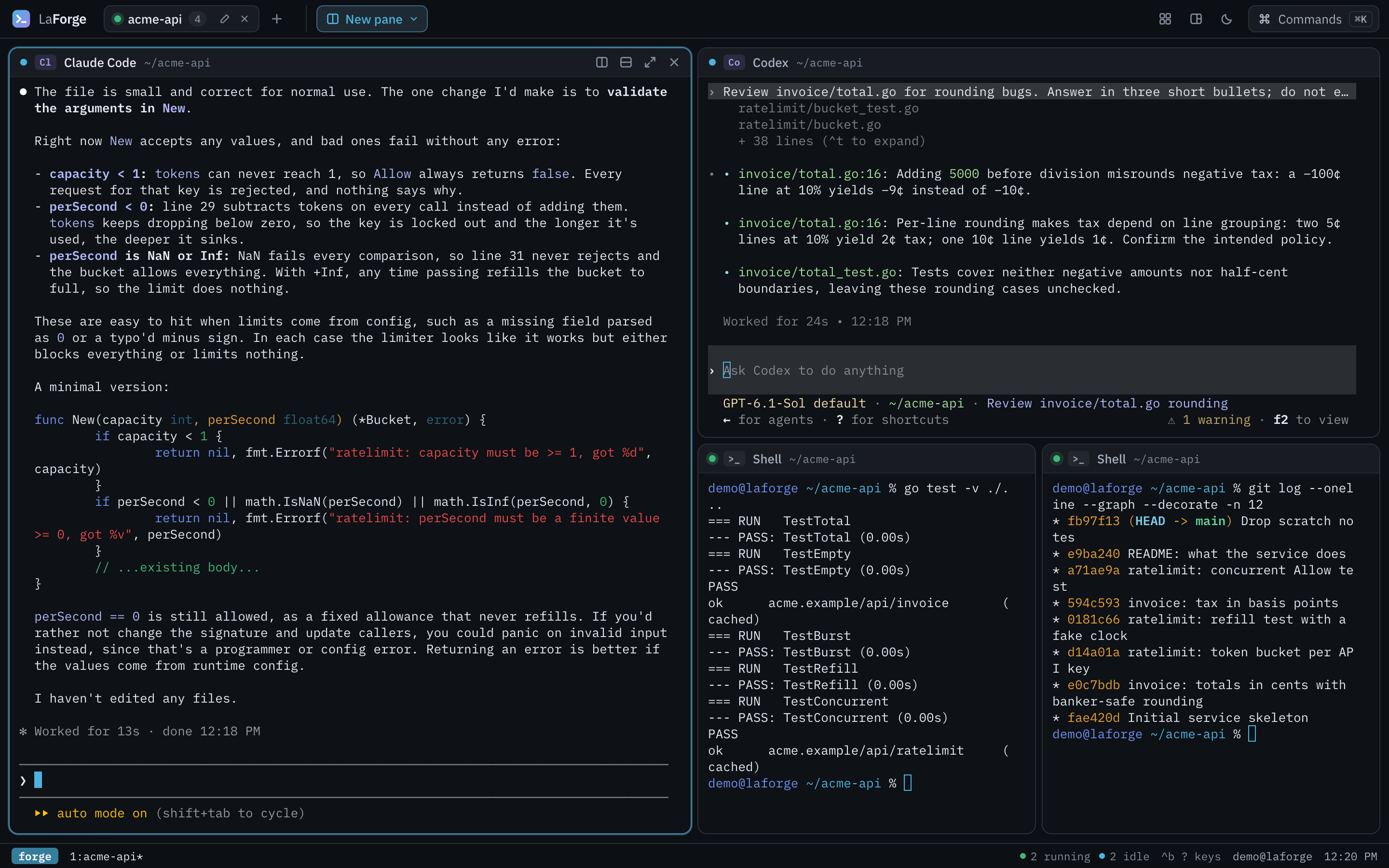
One small server runs on your machine, bound to 127.0.0.1. It holds every terminal: shells and agents alike, each in a real pseudo-terminal. The browser is only a view of them.
- Tabs and splits. Lay panes out however you like. Drag the gaps, zoom one pane to full size, flip between tiled and main-and-stack. Ctrl-b and the tmux keys work; so does a ⌘K command palette.
- Agents in any pane. The New pane menu offers Claude Code, Codex, Antigravity, Qwen Code, GitHub Copilot, Grok, opencode and Ollama, if they're installed. Each runs unchanged, with its own login. Add your own in a
profiles.json. - Panes outlive the browser. Close the tab, reload, quit the browser. The forge keeps everything running and reattaches each pane with its scrollback.
- An agent that exits leaves a shell. When an agent finishes, its pane becomes a shell in the same folder, so you can look at what it did without opening anything new.
- Or run it in a container.
la up --containerruns the forge with Codex, Qwen Code and opencode inside it, so the host needs nothing but Docker or Podman.
It is deliberately not an orchestrator. LaForge doesn't tell your agents what to do, route messages between them or decide when they're finished. Tools that do that exist, and Outcome is one of them. LaForge is the layer underneath: a well-lit room where you can see everyone working.
Smaller on purpose#
Earlier posts on this site describe a larger LaForge, a studio product with a lot more surface. This release is a fresh start. Pete's rule while it was built: before anything moves out of Outcome, prove that a simple, standalone LaForge can serve the capability on its own. So the new LaForge is one Go binary with the web client embedded, Apache-2.0, and usable as a library. The forge is an http.Handler, and the la command tree mounts inside another CLI. Outcome mounts it as out la.
Small also made it easier to get right. Before the release it went through two full code reviews. They turned up twenty findings, and every one was fixed before the tag. A few of them:
- A web page on another local port could have started processes through the browser's login cookie. The forge now accepts changes only from its own page.
- A terminal that fell behind could have drawn a screen with output missing. It now redraws whole.
- A slow start could have let
la uplaunch a second forge on top of the first.
The installer verifies a signed checksum file before it places a single byte. It refuses to replace an la it didn't install. And it runs on macOS and Linux, with Windows builds marked experimental.
Built in it#
The last stretch of this release ran inside LaForge itself. The screenshots on the home page, the demo video and the pages you're reading were produced by two agents, one making the media and one building the site. Each ran in a LaForge pane, in its own git worktree, in a forge of their own on a different port from Pete's everyday one. When either needed a decision, the prompt waited in its pane, and Pete answered it there.
That is the use case, at small scale: two agents, one tab, both visible at once. Neither one got lost behind another window.
Try it#
curl -fsSL https://getlaforge.com/install | sh
la up
Installation options, checksums and the container are on the download page. The source, the changelog and the issues are on GitHub. If you run more than one agent at a time, we'd like to hear what your desktop looks like now, and what it looks like after a week with LaForge.
CategoriesEngineering